Checked October 31, 2026
How to Collect Cash, Equip Animals and Check Rebirth
Use animal rows to collect earnings, distinguish selling controls, and read the cash consequence before rebirth.
Quick answer
Use animal rows to collect earnings, distinguish selling controls, and read the cash consequence before rebirth.
How to Collect Cash, Equip Animals and Check Rebirth
Follow the controls currently shown in your game. Recorded numbers can change.
Separate egg equipment from animal equipment
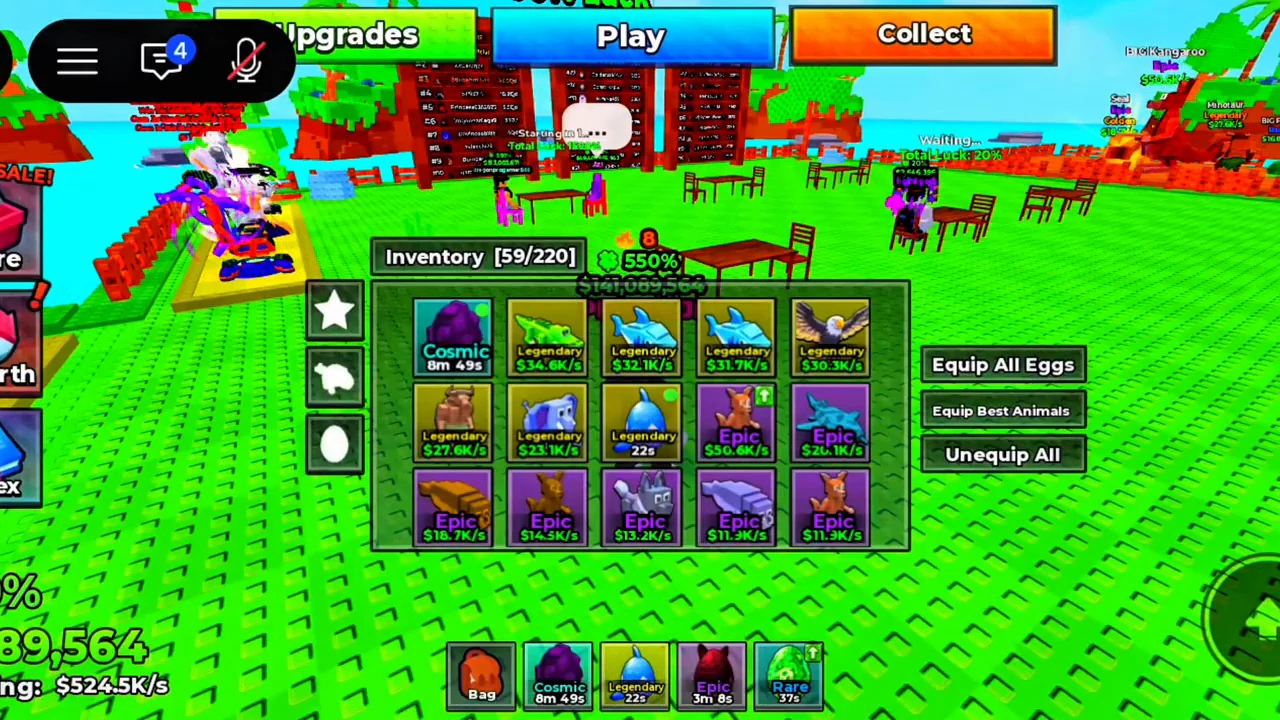
Open the Bag item in the hotbar to inspect the inventory.
- Success check
- The equipment choice matches eggs or animals.
- If it remains unclear
- Inspect the named controls; the ranking rule for Best is unverified.
Read the supporting evidence
§Separate egg equipment from animal equipment#
Open the Bag item in the hotbar to inspect the inventory. The reviewed inventory shows a grid containing egg timers and animal income labels, together with three named controls: Equip All Eggs, Equip Best Animals and Unequip All.
Choose the control that matches your task. Equip All Eggs concerns eggs waiting to hatch; Equip Best Animals concerns the animal side of the collection. Unequip All clears equipment. The footage shows these labels and the grid, but does not verify how the game ranks Best, a universal equipment cap or the effect of unequipping on income.
Open Collect and read the animal rows
Use Collect on the top bar to open Collect Cash.
- Success check
- The displayed earnings are credited to your balance.
- If it remains unclear
- Check further rows and the current Collect All total.
Read the supporting evidence
§Open Collect and read the animal rows#
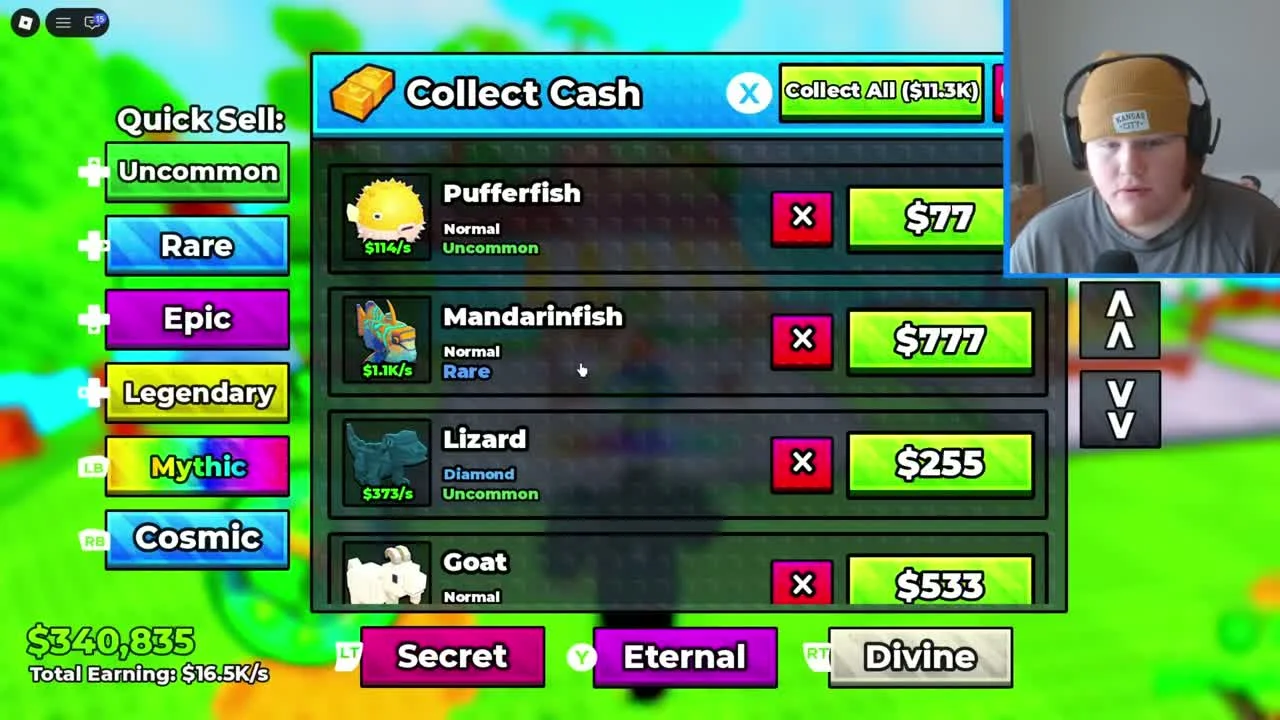
Use Collect on the top bar to open Collect Cash. Each visible row identifies an animal and shows its mutation, rarity, income rate and a separate green cash button. A Pufferfish row, for example, has a rate under its icon and a different amount on the green button.
For one animal, choose its green cash amount; for the collection, the window provides Collect All with a displayed total. Check the amount before and after your own collection. The screenshot demonstrates the control locations and different kinds of numbers, without establishing a universal payout interval, offline accrual or storage cap.
The arrow controls on the right of the list let the recorded player move through additional animal rows. If you cannot see an animal in the first group, inspect the rest of the list and your inventory before assuming it is missing.
Keep Quick Sell separate from collecting earnings
Quick Sell is a separate group of rarity buttons to the left of the animal list.
- Success check
- You collect earnings without choosing a sale control.
- If it remains unclear
- Leave the sale controls untouched if you intend to keep the animal.
Read the supporting evidence
§Keep Quick Sell separate from collecting earnings#
Quick Sell is a separate group of rarity buttons to the left of the animal list. Red X controls sit beside individual animal rows. These are visually separate from the green cash buttons and Collect All at the top.
When your aim is to collect income and keep animals, use the collection controls. Do not select Quick Sell or a red X merely because a row has money beside it. No selected frame shows a completed sale, its confirmation or payout, so this guide does not promise a sale value, undo option or exact red-X behavior.
Read the cash consequence before rebirth
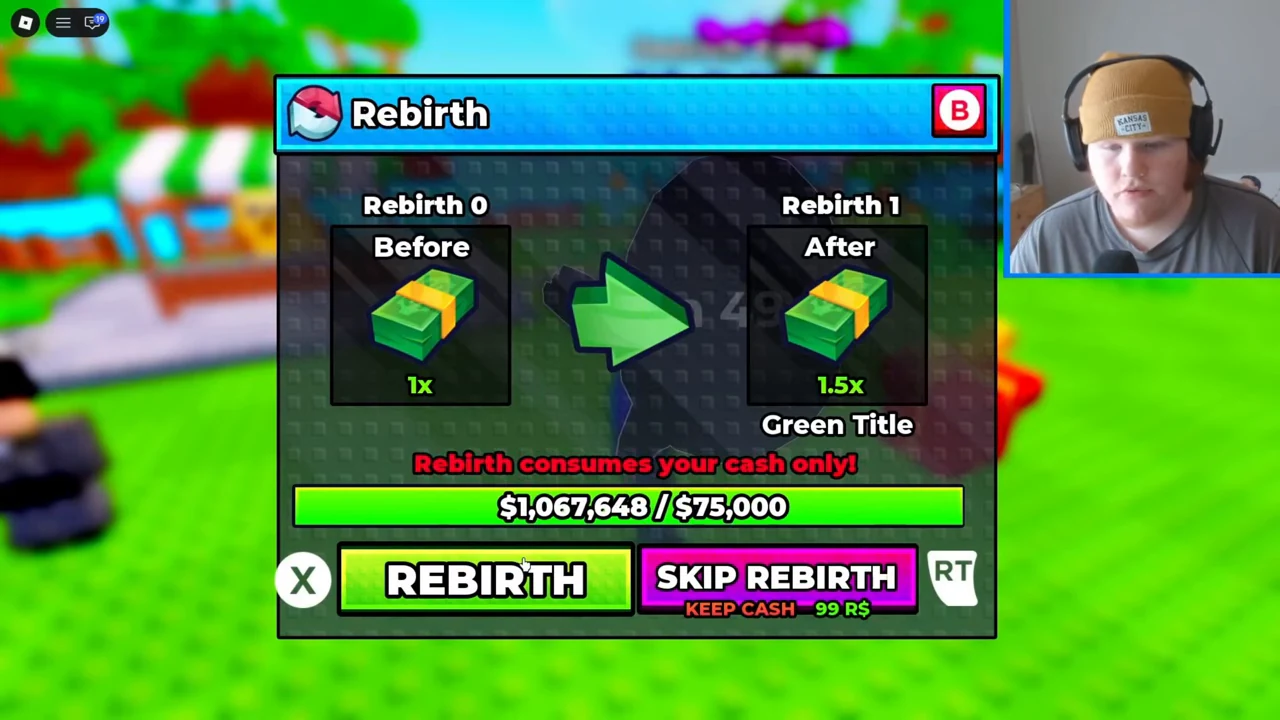
The reviewed Rebirth window compares Rebirth 0 with Rebirth 1 and states Rebirth consumes your cash only! It shows a before-and-after cash multiplier and a cash requirement bar.
- Success check
- You understand the current requirement and cash consequence before deciding.
- If it remains unclear
- Close the window if the reset consequence is unclear.
Read the supporting evidence
§Read the cash consequence before rebirth#
The reviewed Rebirth window compares Rebirth 0 with Rebirth 1 and states Rebirth consumes your cash only! It shows a before-and-after cash multiplier and a cash requirement bar. Open the current window and read both its requirement and consequence before choosing REBIRTH.
SKIP REBIRTH appears as a separate paid control with KEEP CASH in the recorded window. Treat it as a different purchase flow and inspect the current Roblox prompt. The screenshot is a menu observation, not a purchase test or a verified post-reset inventory comparison; later rebirth costs, rewards and reset outcomes may differ.
Scope and sources
Official loop with recorded interface observations checked October 31, 2026.
- The developer confirms the core loop. Exact values and unverified interface details are omitted.